OpenClaw Architecture: Anatomy of a Personal AI Agent
How OpenClaw is built — the Gateway process, the workspace file system, the 8 auto-loaded files, the config surface, and the system prompt assembly that turns markdown into a running agent.
OpenClaw is the most widely deployed open-source AI agent framework. It runs as a single Node.js process — the Gateway — inside a Docker container you control. Everything the agent knows, everything it’s allowed to do, and everything it remembers lives in files on disk. The LLM is raw intelligence. The files are the agent.
This is an architecture reference for operators. Not a tutorial, not a pitch — a map of the system for anyone who needs to understand what they’re running.
The Gateway: one process, one port
The Gateway (src/gateway/server.impl.ts) is the entire control plane. It binds to 127.0.0.1:18789, serves a WebSocket API, an HTTP API (including the Control UI), and manages every subsystem:
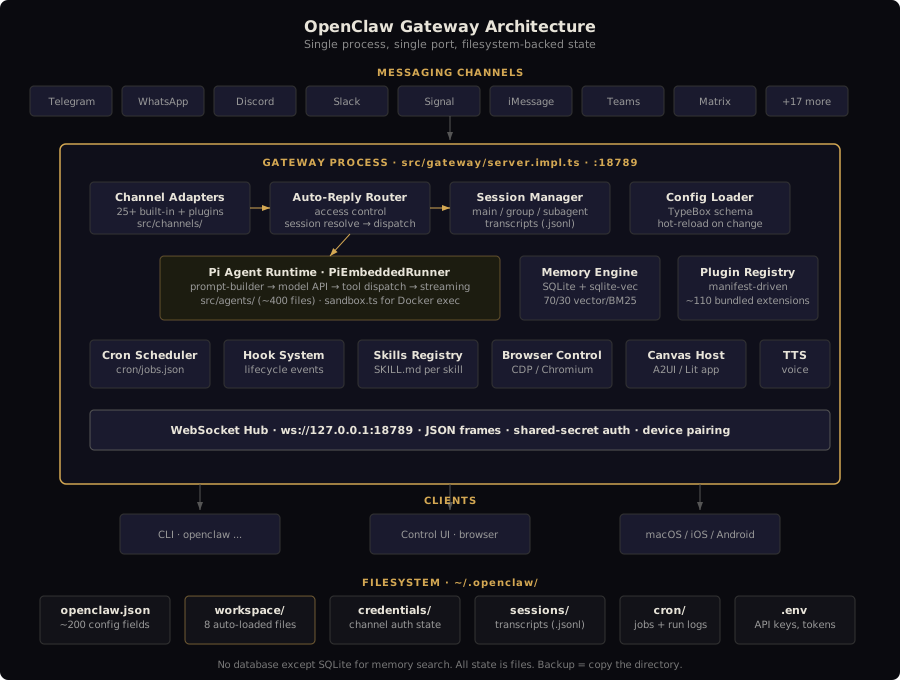
One Gateway per host. One config file. One workspace directory. Clients — the CLI, the web UI, macOS/iOS/Android companion apps — all connect over the same WebSocket. The Gateway is the only process that holds messaging sessions (the WhatsApp Baileys session, the Telegram bot polling loop, etc.).
Startup is sequential and deliberate: load config snapshot, bootstrap plugins, resolve runtime config, create channel manager, start runtime services, attach WebSocket handlers, activate cron/heartbeat. The Gateway creates ~15 child loggers for subsystems (channels, plugins, cron, discovery, health, secrets, etc.) and watches the config file for hot-reload.
The workspace: files are the agent
~/.openclaw/
├── openclaw.json           # Runtime configuration (JSON5)
├── .env                    # Secrets (API keys, tokens)
├── workspace/              # The agent's brain
│   ├── SOUL.md             # Character, tone, values, hard limits
│   ├── AGENTS.md           # Operating procedures, workflow rules
│   ├── USER.md             # Context about the human
│   ├── IDENTITY.md         # Name, emoji, avatar
│   ├── TOOLS.md            # Environment-specific notes
│   ├── HEARTBEAT.md        # Autonomous check-in checklist
│   ├── MEMORY.md           # Curated long-term memory
│   ├── BOOTSTRAP.md        # First-run onboarding (delete after)
│   ├── memory/             # Daily session logs
│   │   ├── YYYY-MM-DD.md   # Append-only daily notes
│   │   └── archive/        # Logs older than 30 days
│   ├── skills/             # Workspace-specific skills
│   ├── hooks/              # Workspace-specific hooks
│   ├── checklists/         # Operation checklists
│   └── docs/               # On-demand reference (NOT auto-loaded)
├── credentials/            # Channel auth state
├── sessions/               # Conversation transcripts (.jsonl)
├── cron/                   # Job definitions + run logs
├── skills/                 # Managed skills from ClawHub
└── browser/                # Managed Chromium state
The entire ~/.openclaw/ directory should be chmod 700. Credentials and .env are chmod 600. The workspace directory is the most important thing in the system — it is what makes your agent yours.
The 8 auto-loaded files
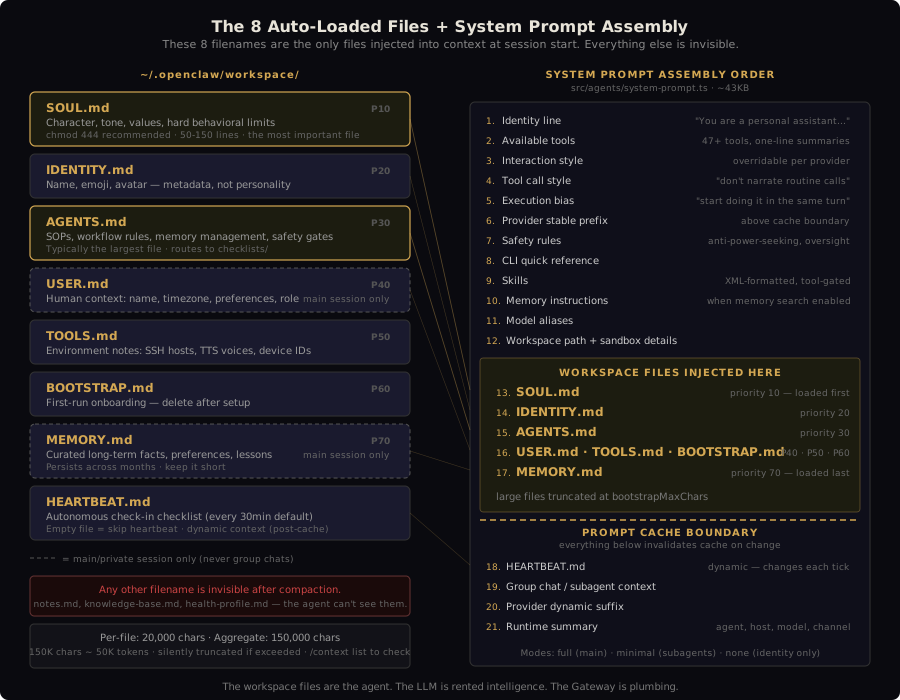
This is the single most important architectural constraint in OpenClaw, and the one most operators don’t understand:
OpenClaw auto-loads exactly 8 filenames at session start: SOUL.md, AGENTS.md, USER.md, IDENTITY.md, TOOLS.md, HEARTBEAT.md, MEMORY.md, and BOOTSTRAP.md. Any file with a different name — notes.md, knowledge-base.md, health-profile.md — is invisible to the agent unless it explicitly reads it with a tool call. After context compaction, those files are gone.
Each file has a specific purpose. Getting things in the wrong file is a common source of behavioral problems.
SOUL.md — who the agent is
The most important file in the ecosystem. Persona, tone, values, hard behavioral limits. “Direct, friendly, patient. Never condescending.” It is entirely prompt-driven — well-crafted markdown injected into the system prompt before every message.
What belongs here: core personality, communication style, ethical boundaries, conditional mode switching (different behavior for code review vs. brainstorming), tool preferences. What does not belong: operational procedures (AGENTS.md), info about the human (USER.md), environment details (TOOLS.md).
Best practice: 50-150 lines. chmod 444 to prevent the agent from self-modifying its own personality — this was a documented attack vector in the ClawHavoc prompt injection campaign. Version-control it with git.
AGENTS.md — what the agent does
Standard operating procedures, workflow rules, memory management directives. If SOUL.md answers “who are you?”, AGENTS.md answers “what do you do and how?” This is typically the largest file — it defines the agent’s operational discipline.
Contains: session startup checklist (what to read, in what order), memory rules (when to write, what goes where), safety gates (show the plan, get approval, then execute), communication rules for group chats, git conventions, skill notes, and a checklists routing table that maps operations to detailed checklist files in checklists/.
USER.md — who it’s talking to
Context about the human: name, timezone, professional role, communication preferences, recurring constraints. Only loaded in private/main sessions, never in group chats. This is the personalization layer that makes the agent feel like it knows you.
IDENTITY.md — name and presentation
Name, emoji, avatar path. Metadata, not personality — personality goes in SOUL.md. If the agent introduces itself using its internal config ID instead of its persona name, the most common cause is boot files not loading (often due to the symlink escape security check).
TOOLS.md — environment notes
Documents environment-specific details: SSH hosts and aliases, preferred TTS voices, camera IDs, device nicknames, tool quirks. This is guidance only — it does not grant or revoke tool permissions. Tool policy is enforced in openclaw.json via tools.allow/tools.deny.
HEARTBEAT.md — the autonomous loop
A tiny checklist for the periodic “is anything worth doing?” check. The heartbeat is what makes the agent feel aware when you’re not talking to it. OpenClaw reads this file on each heartbeat tick (default: every 30 minutes). If the file exists but is effectively empty, OpenClaw skips the run to save tokens.
Critical cost warning: native heartbeat can become a major token sink. Heartbeat turns frequently run with the full main-session context — 170k-210k input tokens per run has been observed. Best practice is isolated cron-driven heartbeats that run in their own lightweight session.
MEMORY.md — curated long-term knowledge
Loaded only in main/private sessions. Curated facts, preferences, project summaries, lessons learned — things you want to persist across months. Keep it short; anything that doesn’t need to be in every session can live in daily logs and be found via semantic search.
BOOTSTRAP.md — first-run setup
One-time onboarding ritual. Created for a brand-new workspace, intended to be deleted after the first conversation. Skip future runs with agent.skipBootstrap: true when managing files manually.
Truncation limits
All bootstrap files are subject to two caps: 20,000 characters per file (bootstrapMaxChars) and 150,000 characters aggregate (bootstrapTotalMaxChars). These are character counts, not tokens — 150K chars is roughly 50K tokens. Files that exceed the per-file limit get silently truncated. Use /context list in-session to see exactly what’s loaded, truncated, or missing.
Symlink security constraint
OpenClaw’s resolveAgentWorkspaceFilePath() runs assertNoPathAliasEscape on every file access. If a file’s realpath resolves outside the workspace root, it is silently ignored — no error, no log, the file just doesn’t exist. This means workspace files must be real copies, not symlinks to a source repo. Maintain a source-of-truth repo separately and copy files in at deploy time.
openclaw.json: the runtime control plane
A single JSON5 file (~/.openclaw/openclaw.json) with ~200+ configurable fields. The config schema is TypeBox-based (src/config/schema.ts) — unknown keys cause the Gateway to refuse to start. Config priority: Environment Variables > Config File > Default Values.
The config controls everything the workspace files don’t: model selection, channel enablement, tool permissions, cron jobs, security posture, autonomy levels, sandbox mode, heartbeat intervals, memory search providers, media pipeline settings, voice configuration.
Key sections:
| Section | Controls |
|---|---|
agents.defaults |
Model, tools policy, sandbox, heartbeat, memory search, compaction, context pruning |
channels.* |
Per-channel enablement, DM policy, allowlists, group policy |
tools.allow / tools.deny |
Tool permission enforcement |
cron |
Scheduled job definitions |
hooks |
Internal hooks (boot-md, soul-evil, bootstrap-extra-files) |
security |
Approval gates, rate limits, exec policy |
plugins |
Plugin enablement and per-plugin config |
providers |
API keys, model routing, auth profiles, failover |
The Gateway exposes config.patch and config.apply RPCs over WebSocket for runtime config changes, rate-limited to 3 writes per 60 seconds. It also watches the config file on disk and hot-reloads on change.
System prompt assembly
The prompt builder (src/agents/system-prompt.ts, ~43KB) assembles the system prompt in a fixed section order. Understanding this order matters for debugging behavioral issues — what comes first has more influence.
 1. Identity line         "You are a personal assistant running inside OpenClaw."
 2. Available tools       One-line summaries of all 47+ tools
 3. Interaction style     Overridable per model provider
 4. Tool call style       "Don't narrate routine tool calls"
 5. Execution bias        "If asked to do the work, start doing it in the same turn"
 6. Provider stable prefix (injected above the cache boundary)
 7. Safety rules          Anti-power-seeking, human oversight, no self-modification
 8. CLI quick reference
 9. Skills                XML-formatted available skills
10. Memory instructions   When memory search is enabled
11. Model aliases
12. Workspace path
13. Sandbox details       When sandbox mode is active
14. Date/time/timezone

    ── BOOTSTRAP FILES ──
15. SOUL.md               Priority 10 (loaded first)
16. IDENTITY.md           Priority 20
17. AGENTS.md             Priority 30 (was 10 in earlier versions)
18. USER.md               Priority 40 (main session only)
19. TOOLS.md              Priority 50
20. BOOTSTRAP.md          Priority 60
21. MEMORY.md             Priority 70 (main session only)

    ── CACHE BOUNDARY ──
22. Dynamic context       HEARTBEAT.md, group chat context, extra system prompt
23. Provider dynamic suffix
24. Runtime summary       One line: agent, host, OS, node, model, channel, thinking level
Three prompt modes exist: full (all sections — used for main sessions), minimal (subagents — omits skills, memory, self-update, messaging), and none (just the identity line).
Providers can override specific sections (interaction_style, tool_call_style, execution_bias) or inject stable prefixes / dynamic suffixes, enabling model-family-specific tuning without forking the prompt builder.
The agent runtime
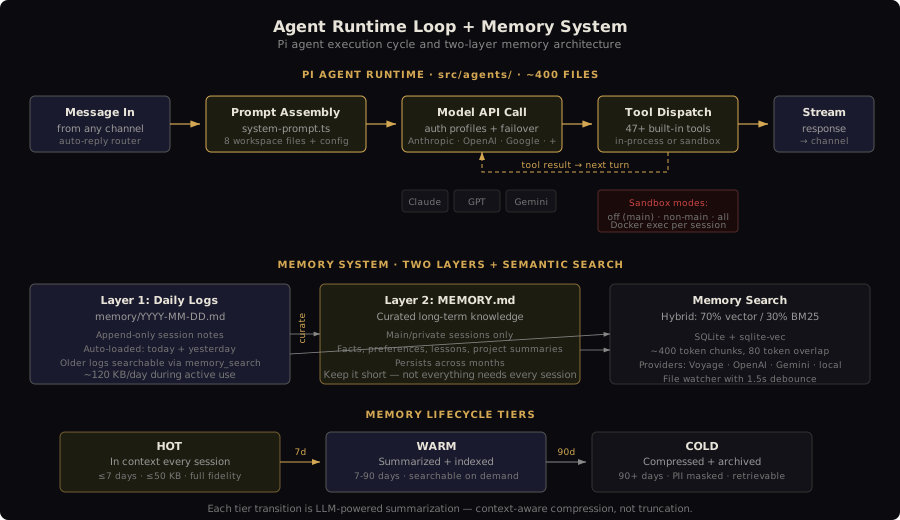
The Pi agent runtime (src/agents/) is the execution engine — roughly 400+ files handling model calls, tool dispatch, streaming, and session management. The core loop:
- Prompt assembly — build system prompt from workspace files + config
- Model call — route to the configured provider (Anthropic, OpenAI, Google, Bedrock, Groq, Mistral, etc.) via auth profiles with cooldown and failover
- Tool dispatch — execute tool calls as function calls in-process, or via Docker exec for sandboxed operations
- Streaming — stream responses back through the channel adapter to the messaging surface
- Memory — write session context to daily logs, update curated memory on request
Tool execution is the most security-sensitive part. In main sessions, tools run on the host with full access by default. Non-main sessions (group chats, untrusted channels) can be sandboxed in per-session Docker containers via agents.defaults.sandbox.mode: "non-main".
Memory: two layers plus search
The memory system transforms OpenClaw from a stateless chatbot into a persistent assistant.
Layer 1: Daily logs (memory/YYYY-MM-DD.md) — append-only session notes. Today + yesterday are auto-loaded at session start. Older logs are accessible via semantic search.
Layer 2: Curated memory (MEMORY.md) — long-term facts, preferences, lessons. Loaded only in main sessions. This is what persists across months.
Memory search uses a hybrid approach: 70% vector similarity (semantic) / 30% BM25 keyword (exact tokens like IDs, env vars, code symbols). Backed by SQLite with the sqlite-vec extension. Chunks are ~400 tokens with 80-token overlap. Supported embedding providers: Voyage (recommended), OpenAI, Gemini, Mistral, Ollama, local GGUF models.
Without management, agent memory grows at ~120KB/day during active use. The memory lifecycle has three tiers: hot (in context, <7 days), warm (summarized and indexed, 7-90 days), cold (compressed and archived, 90+ days). Each transition is LLM-powered — summarization that understands context, not just truncation.
Plugin architecture
OpenClaw’s plugin system (src/plugins/, ~230 files) is manifest-driven with lazy activation. The codebase enforces strict boundaries:
src/plugin-sdk/*is the public contract — extensions must cross into core only through this surface- Core stays extension-agnostic — adding a plugin must not require core edits
- Protocol changes are contract changes — additive evolution only
Bundled extensions (extensions/, ~110 directories) cover providers, channels, memory backends, browser control, voice, media generation, and diagnostics. The plugin SDK exposes 100+ subpath exports. Plugins are distributed via npm and the ClawHub marketplace.
Channel plugins are the most visible: 25+ messaging platforms (WhatsApp, Telegram, Discord, Slack, Signal, iMessage, Teams, Matrix, IRC, Google Chat, LINE, Feishu, Nostr, and more) each implemented as a channel adapter with common config: enabled, dmPolicy, allowFrom, groupPolicy, ackReaction.
Deployment model
OpenClaw ships as a multi-stage Docker build:
- ext-deps — isolate extension dependency resolution via
OPENCLAW_EXTENSIONSbuild arg - build —
pnpm install --frozen-lockfile,pnpm build:docker, build UI and Canvas A2UI - runtime-assets — prune dev dependencies, strip
.d.tsand.mapfiles - runtime — Node 24 on Debian Bookworm (or slim variant), non-root
nodeuser (uid 1000), healthcheck on/healthz
Optional layers: Chromium + Xvfb for browser control (~300MB), Docker CLI for sandboxed tool execution (~50MB), extra apt packages. The runtime binds to loopback by default; override to lan for Docker bridge networking.
The entire system runs as a single process. No database except SQLite for memory search indexing. No message queue. No microservices. State lives in the filesystem. This is both the strength and the constraint — it’s simple to operate, hard to scale horizontally, and completely transparent to anyone who can read files.
What this means for operators
OpenClaw’s architecture has a clear thesis: the agent is its files. The Gateway is plumbing. The LLM is rented intelligence. The workspace — those 8 markdown files, the config, the memory directory — is the thing you’re actually operating.
This means:
- Backup means copying
~/.openclaw/— there’s no database dump, no state reconstruction - Debugging means reading files — if the agent is behaving wrong, one of the 8 files is wrong, or the config is wrong, or the prompt assembly is doing something you don’t expect
- Upgrading means rebuilding the Gateway and preserving the workspace — the agent survives because the files survive
- Security means file permissions and config policy —
chmod 444on SOUL.md, tool deny-lists in config, sandbox mode for non-main sessions, egress rules
The 8-file constraint is the architectural decision that shapes everything downstream. It’s why configuration sprawls to ~13,500 tokens across 11+ files. It’s why operators who put critical knowledge in arbitrarily-named files lose it after compaction. It’s why the management layer — the thing that doesn’t exist yet for most operators — matters so much. You’re operating a system whose identity, behavior, and accumulated knowledge all live in files that the framework reads but never validates, never versions, and never backs up.
That’s the architecture. What you build on top of it is the operations problem.